I'll verify what happens when calling the OpenAI API from Python with both stream and timeout settings enabled.
Introduction
When calling the OpenAI API from Python, you can configure timeout and stream settings.
- Setting Timeout in the OpenAI Python Library - BioErrorLog Tech Blog
- Implementing GPT Stream Responses with OpenAI API in Python - BioErrorLog Tech Blog
I wasn't immediately sure at what point the timeout would trigger when using timeout and stream together, so I decided to test it.
Note: This article was translated from my original post.
Behavior When Combining GPT Stream and Timeout
Hypothesis
There are two possible hypotheses.
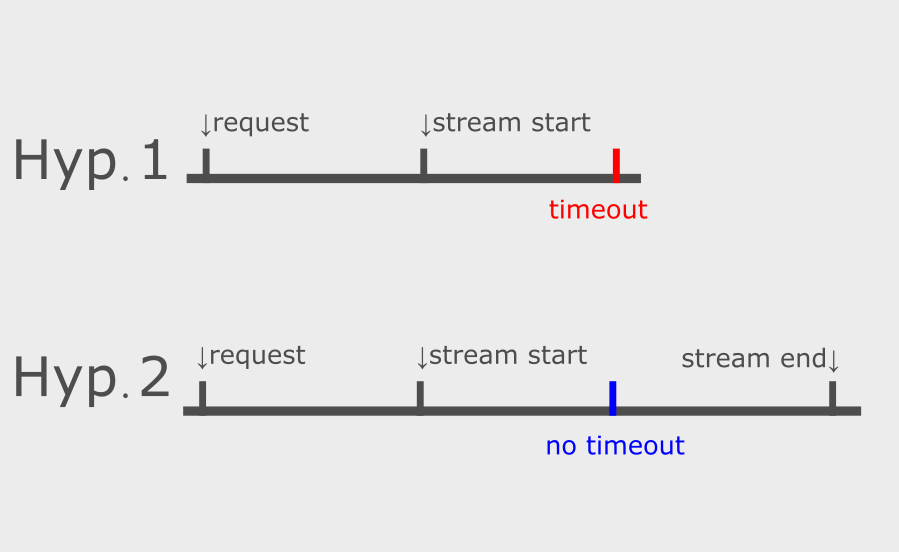
Hypothesis 1: Timeout is applied from the stream end point
With this behavior, even if stream responses are being returned, the process would time out once the timeout duration is reached.
Hypothesis 2: Timeout is applied from the stream start point
With this behavior, once the stream response starts, the timeout would no longer trigger.
Testing Method
I'll call the OpenAI API under conditions where the timeout would occur right in the middle of receiving the stream response, and observe the behavior.
Specifically, I'll run the following Python code:
import os
import time
import openai

openai.api_key = os.environ["OPENAI_API_KEY"]


def main() -> None:
    start_time = time.time()

    response = openai.ChatCompletion.create(
        model="gpt-3.5-turbo-0613",
        messages=[
            {'role': 'user', 'content': 'Tell me about Japanese history.'}
        ],
        stream=True,
        request_timeout=3,
    )

    collected_chunks = []
    collected_messages = []
    for chunk in response:
        chunk_time = time.time() - start_time

        collected_chunks.append(chunk)
        chunk_message = chunk['choices'][0]['delta'].get('content', '')
        collected_messages.append(chunk_message)
        print(f"Message received {chunk_time:.2f} seconds after request: {chunk_message}")

    full_reply_content = ''.join(collected_messages)
    print(f"Full conversation received: {full_reply_content}")


if __name__ == "__main__":
    main()
Ref. python-examples/openai_stream_timeout/main.py at main · bioerrorlog/python-examples · GitHub
The key points are:
- Send a question that takes time to generate a response
- Set the timeout to trigger after the stream response starts but before the answer is fully generated
Let's look at the results.
Test Results
The result: no timeout occurred.
This means the behavior follows Hypothesis 2 mentioned earlier, and the timeout is applied from the stream start point.
# Execution result
$ python main.py
Message received 1.86 seconds after request:
Message received 1.86 seconds after request: Japanese
Message received 1.86 seconds after request:  history

# Omitted

# No timeout occurs at the configured timeout duration (3 sec)
Message received 2.80 seconds after request:  The
Message received 2.82 seconds after request:  earliest
Message received 2.98 seconds after request:  known
Message received 2.99 seconds after request:  human
Message received 3.01 seconds after request:  hab
Message received 3.02 seconds after request: itation
Message received 3.03 seconds after request:  in
Message received 3.04 seconds after request:  Japan

# Continued below
By the way, if you set the timeout before the stream starts (such as 0.5 seconds), the timeout will trigger normally.
Summary
To summarize, the behavior when combining stream and timeout is as follows:
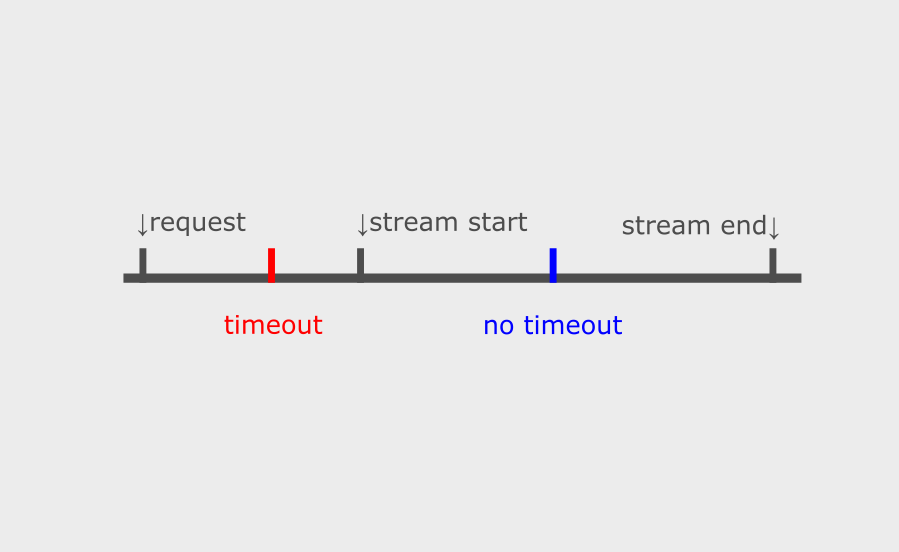
- If the stream start is slower than the configured timeout, a timeout occurs
- If the stream starts before the configured timeout, no timeout occurs
Conclusion
Above, I tested the behavior when combining GPT stream and timeout.
This was something I was curious about, so I'm glad to have clarity now.
I hope this is helpful to someone out there.
[Related Articles]
